sample-of Ancestor2, and Descendant is a sample-of Ancestor.Traversing graphs
In the graph model used here the arrows are pointing from the descendant to the ancestor. It is done this way for practical purposes - it is easier to add edges to a derived record than to update an origin record each time a derivative is made. Hence, a subsample-of relation here indicates that the record containing the relation is a subsample of the target of that relation, and the origin is an ancestor of the record. This basic pattern is shown in Figure 1.
sample-of Ancestor2, and Descendant is a sample-of Ancestor.Expressed as JSON records:
[
    {
        "id":"Ancestor2",
        "name_t":"The source record",
        "_root_":"Ancestor"
    },
    {
        "id":"Ancestor",
        "name_t":"A derived record",
        "_root_":"Ancestor",
        "edges":[
            {
                "id":"relation_01",
                "relation_type_s":"subsample-of",
                "target_s":"Ancestor2",
                "_nest_parent_":"Ancestor",
                "_root_":"Ancestor",
                "_nest_path_":"/edges#0"
            }
        ]
    },
    {
        "id":"Descendant",
        "name_t":"Another derived record",
        "_root_":"Descendant",
        "edges":[
            {
                "id":"relation_02",
                "relation_type_s":"subsample-of",
                "target_s":"Ancestor",
                "_nest_parent_":"Descendant",
                "_root_":"Descendant",
                "_nest_path_":"/edges#0"
            }
        ]
    }
]The fields _root_, _nest_parent_, and _nest_path_ are computed by Solr, and should not be included in the documents when indexing. They are included here to indicate the values set by Solr.
The basic form of a solr query for this operation is a graph expression traversing from a descendant record to targets of the relations.
The graph query:
{!graph from=FROM_FIELD to=TO_FIELD}ROOT_DOCUMENTSroughly corresponds to the pseudo code:
start_docs = ROOT_DOCUMENTS
while start_docs is not empty:
    for each document in start_docs:
        for each value of TO_FIELD:
            set start_docs to documents with FROM_FIELD matching value
Where:
In the two node example above, FROM_FIELD corresponds to the parent of the related edge documents and TO_FIELD corresponds with the target_s value of the edge document.
Since relations are held in the nested documents, it is necessary to seed the starting points of the graph traversal with the nested child relation documents, however we are typically quarying on properties of the parent of the nested child. Hence the root nodes for starting the traversal are found by selecting the child documents of parent documents that match some filter. This is done using the Solr !child query parser:
{!child of=PARENT_MASK}SOME_PARENTSwhere:
*:* or id:Descendant.
*:* -_nest_path_:* (all documents in SOME_PARENTS that don’t have a _nest_path_ field).
Combining the !graph and !child query parsers provides a pattern facilitating traversal across ancestor documents. For example:
{!graph
    from=_nest_parent_
    to=target_s
}(
    {!child
        of="*:* -_nest_path_:*"
    }id:Descendant
)
Says given the child document of the document with id of “Descendant”, get documents with _nest_parent_ matching the value of _target_s. At this point, we have all the related nested documents that point to ancestors of “Descendant”, which in this case is simply the single document with identifier “relation_01”.
Note that the ancestors are actually the documents that are referenced from the value of the target_s field. There are a couple options to retrieve those documents. One is the !join query parser:
{!join
    from=target_s
    to=id
}(
    {!graph
        from=_nest_parent_
        to=target_s
    }(
        {!child
            of="*:* -_nest_path_:*"
        }id:Descendant
    )
)
An alternative, when using streaming expressions is to use the fetch stream decorator:
fetch(COLLECTION,
    search(COLLECTION,
        q="{!graph
                from=_nest_parent_
                to=target_s
            }(
            {!child
                of='*:* -_nest_path_:*'
            }id:Descendant
        )",
    ),
    fl="id, name_t",
    on="target_s=id"
)The two ancestor approaches are illustrated here using the example_graph.
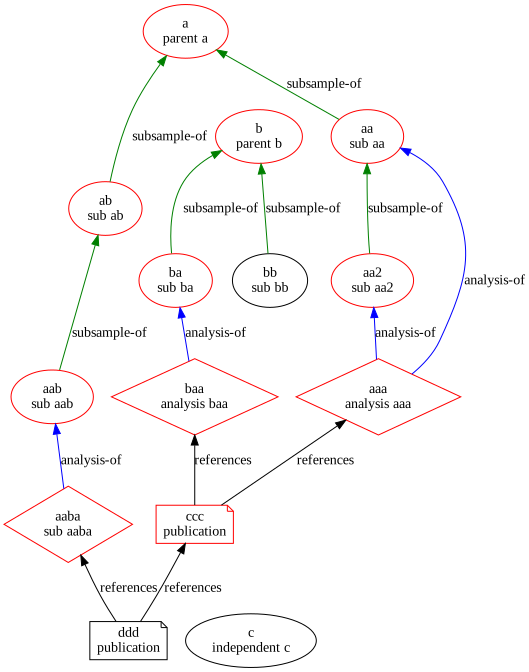
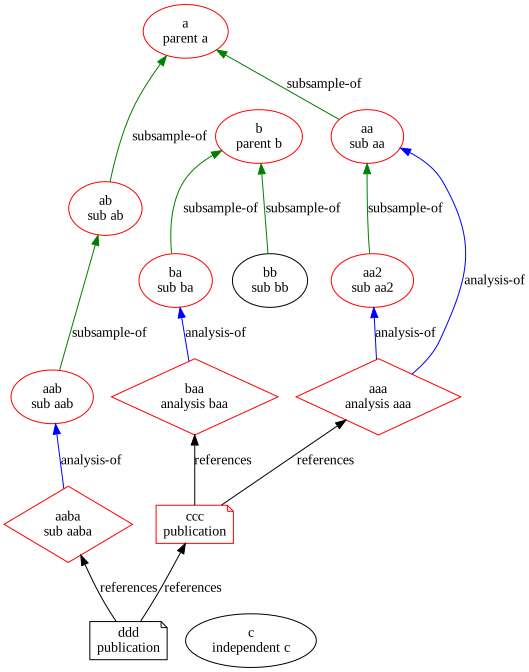
In both cases, we are looking for all records that are the ancestors of the node id:ddd. This could easily be expanded to include many starting root nodes by adjusting the initial filter query to match multiple nodes..
The first uses the !join query expression. See Figure 2.
import example_graph
import graphutzing

solr = graphutzing.SolrConnection()

ex0 = '''search(reltest,
    q="{!join
            from=target_s
            to=id
        }{!graph
            from=_nest_parent_
            to=target_s
        }({!child
            of='*:* -_nest_path_:*'
        }id:ddd)",
    fl="*",
    rows=100
)'''
print(ex0)
res = solr.sendExpr(ex0)
solr.render(example_graph.docs, res)
search(reltest,
q="{!join
from=target_s
to=id
}{!graph
from=_nest_parent_
to=target_s
}({!child
of='*:* -_nest_path_:*'
}id:ddd)",
fl="*",
rows=100
)
join on the edge target.The second uses the fetch stream decorator, see Figure 3:
fetch(reltest,
    search(reltest,
        q="{!graph
            to=target_s
            from=_nest_parent_
        }({!child
            of='*:* -_nest_path_:*'
        }id:ddd)",
        fl="*",
        rows=100
    ),
    fl="id,name_t",
    on="target_s=id"
)
fetch from the edge target.This pattern can be used to find ancestors that match a filter.
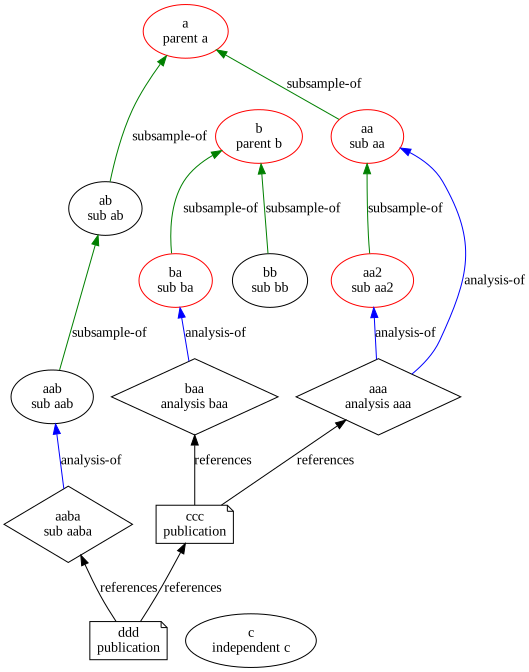
In this case, documents that are the ancestor of ccc are found by an ancestor graph traversal, then only the documents from that set that are samples (is_s:sample) are returned.
ex1 = '''    search(reltest,
            q="{!graph
                to=target_s
                from=_nest_parent_
            }(_nest_parent_:ccc)",
            fl="*,target_s,_nest_parent_,[child]",
            rows=100
        )'''
# Using the fetch operation to retrieve fields from documents found in the graph walk
ex2 = f'''fetch(reltest,
    {ex1},
        fl="id,name_t,is_s,[child]",
        on="target_s=id"
    )'''
ex3 = f'''
having(
    {ex2},
    eq(is_s,"sample")
)'''
print(ex3)
res = solr.sendExpr(ex3)
solr.render(example_graph.docs, res)
having(
    fetch(reltest,
        search(reltest,
            q="{!graph
                to=target_s
                from=_nest_parent_
            }(_nest_parent_:ccc)",
            fl="*,target_s,_nest_parent_,[child]",
            rows=100
        ),
        fl="id,name_t,is_s,[child]",
        on="target_s=id"
    ),
    eq(is_s,"sample")
)
ccc.Finding Descendants is similar to finding ancestors, except we are walking the graph in the opposite direction, so the to and from properties of the !graph expression are reversed. Since the Descendants contain the nested relations, retrieving the parent document is a bit simpler since it is just the documents with id matching _nest_parent_.
In this example derivatives (i.e. Descendants) of id:b are found.
fetch(
    reltest,
        search(
        reltest,
        q="{!graph
            to=_nest_parent_
            from=target_s
        }target_s:b",
        fl="*",
        rows=100
    ),
    fl="id,name_t,[child]",
    on="_nest_parent_=id"
)
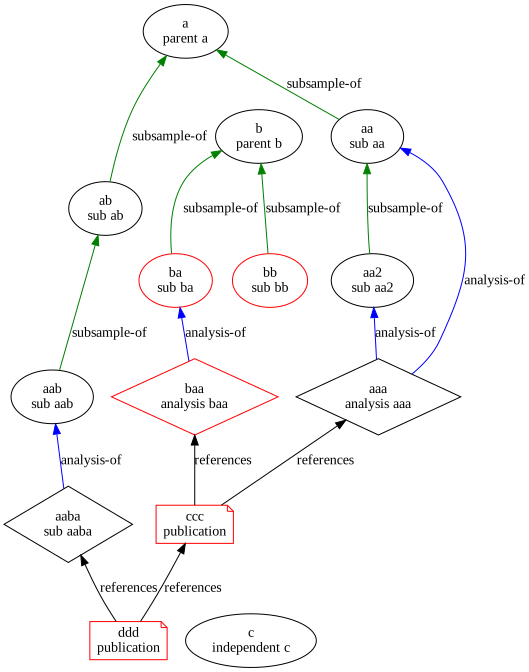
b using fetch on _nest_parent_.Alternatively, we can use the !parent query parser to similar effect:
search(reltest,
    q="{!parent which='*:* -_nest_path_:*'}({!graph
        to=_nest_parent_
        from=target_s
    }target_s:b)",
    fl="*",
    rows=100
)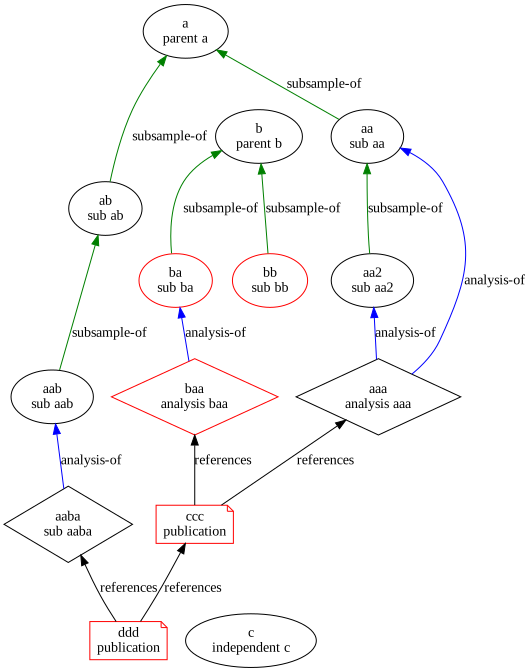
b using the !parent query parser on nodes emitted by graph traversal.In this case we are looking for analyses that were performed on material derived from sample a.
We follow the Descendants graph, but limit the traversal to only include sample-of or analysis-of relations to limit the reduce the scope of traversal. This exclusion is optional, but included here to illustrate the effect of the traversal_filter option. The resulting set of nodes includes samples and analyses. The analysis nodes are selected from that set using the having clause.
# Start with a as the target of a relation
q1 = 'target_s:a'
# Traverse the graph starting from q1, limit relations being followed to sample-of and analysis-of
q2 = '{!graph to=_nest_parent_ from=target_s traversal_filter="relation_type_s:[subsample-of OR analysis-of]"}'
ex1 = '''search(
            reltest,
            q="{!graph
                to=_nest_parent_
                from=target_s
                traversal_filter='relation_type_s:[subsample-of OR analysis-of]'
            }target_s:a",
            fl="*",
            rows=100
        )'''
# Fetch the records
ex2 = f'''fetch(
        reltest,
        {ex1},
        fl="id,name_t,is_s,[child]",
        on="_nest_parent_=id"
    )'''
# And include only records that are an analysis
ex3 = f'''having(
    {ex2},
    eq(is_s,"analysis")
)'''
print(ex3)
res = solr.sendExpr(ex3)
solr.render(example_graph.docs, res)
having(
fetch(
reltest,
search(
reltest,
q="{!graph
to=_nest_parent_
from=target_s
traversal_filter='relation_type_s:[subsample-of OR analysis-of]'
}target_s:a",
fl="*",
rows=100
),
fl="id,name_t,is_s,[child]",
on="_nest_parent_=id"
),
eq(is_s,"analysis")
)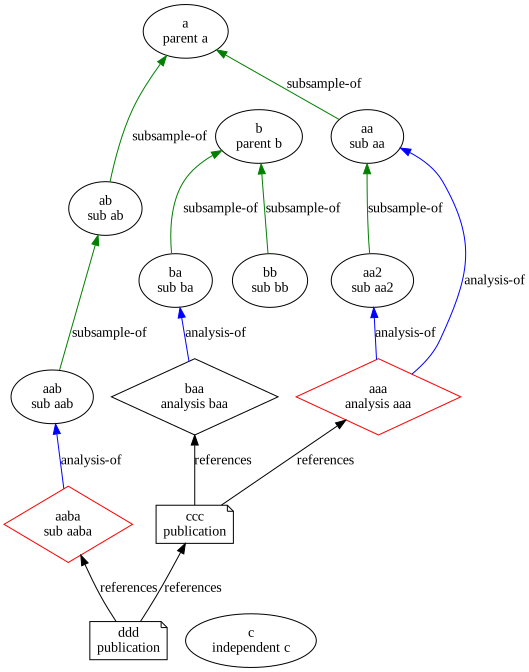
a.In the simplest case, this is following ancestors or descendants from two or more root nodes. In the case where there are two graphs constructed differently and we need the set of all nodes included in both, then we can OR the two queries and if necessary apply a Unique stream decorator.
Use the conjunction stream decorator.
Can be achieved programmatically by counting the nodes or by applying an operation such as rollup using a count(*) metric.
shortestPathThe shortestPath stream source computes the paths between two node, returned as a list of tuples. Each tuple contains the node IDs on a path between the starting nodes.
shortestPath(
    reltest,
    from="ddd",
    to="a",
    edge="_nest_parent_=target_s",
    maxDepth=50
)
{
  "result-set": {
    "docs": [
      {
        "path": [
          "ddd",
          "ccc",
          "aaa",
          "aa",
          "a"
        ]
      },
      {
        "path": [
          "ddd",
          "aaba",
          "aab",
          "ab",
          "a"
        ]
      },
      {
        "EOF": true,
        "RESPONSE_TIME": 15
      }
    ]
  }
}nodesThe nodes stream source does graph traversal, but does not iterate across all nodes of the graph. Instead the operation traverses one level at a time. nodes sources may be nested to reach deeper into a graph.
expr = '''nodes(reltest,
    nodes(
        reltest,
        walk="ddd->_nest_parent_",
        gather="target_s",
        scatter="branches, leaves"
    ),
    walk="node->_nest_parent_",
    gather="target_s",
    scatter="branches, leaves"
)'''
print(expr)
res = solr.sendExpr(expr)
solr.render(example_graph.docs, res, show_docs=True, show_graph=False)
nodes(reltest,
nodes(
reltest,
walk="ddd->_nest_parent_",
gather="target_s",
scatter="branches, leaves"
),
walk="node->_nest_parent_",
gather="target_s",
scatter="branches, leaves"
)
{
"result-set": {
"docs": [
{
"node": "ddd",
"collection": "reltest",
"field": "node",
"level": 0
},
{
"node": "ccc",
"collection": "reltest",
"field": "target_s",
"level": 1
},
{
"node": "aaba",
"collection": "reltest",
"field": "target_s",
"level": 1
},
{
"node": "aaa",
"collection": "reltest",
"field": "target_s",
"level": 2
},
{
"node": "aab",
"collection": "reltest",
"field": "target_s",
"level": 2
},
{
"node": "baa",
"collection": "reltest",
"field": "target_s",
"level": 2
},
{
"EOF": true,
"RESPONSE_TIME": 7
}
]
}
}